Strategy RPG Heart of the Machine is making things a bit more manageable for newer players with today’s update 64, which focuses on reusable loadouts and automation while squashing several pesky bugs.
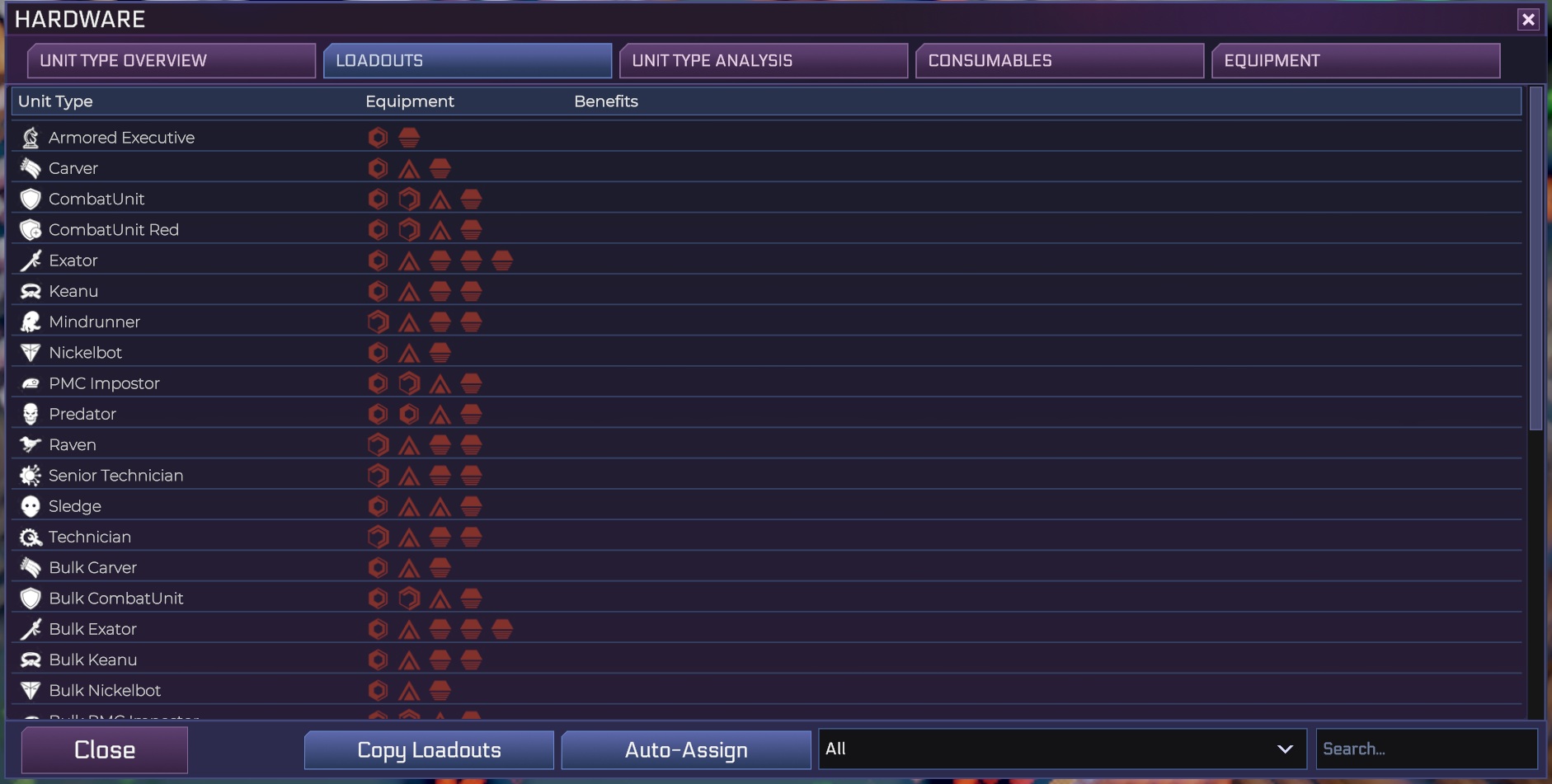
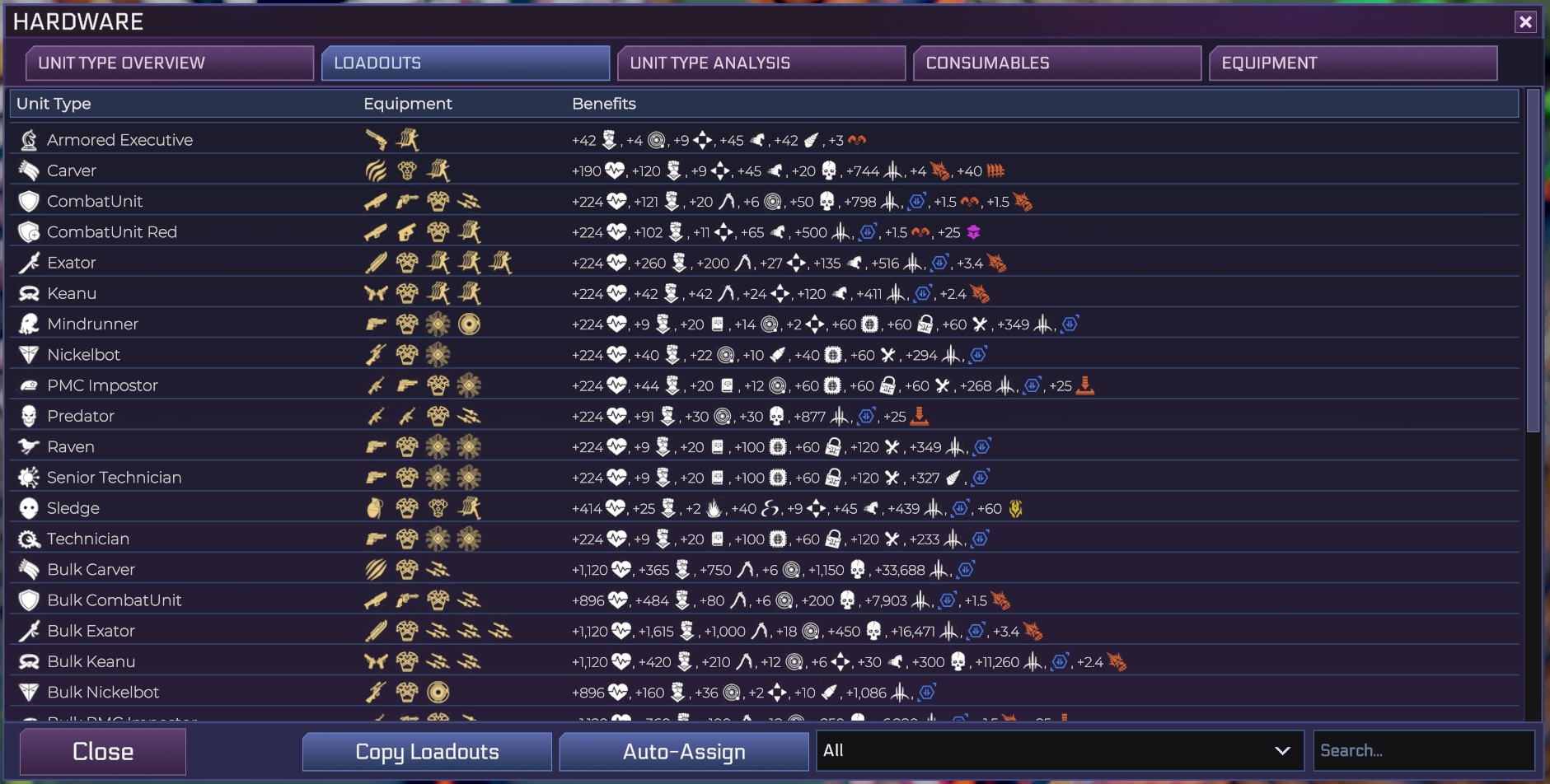
The hardware screen has received a nifty new loadout tab that gathers a list of all of units and their current loadouts while also allowing us to easily check equipment, spot empty slots, as well as more easily determine how stats change as we shuffle gear around.
Heart of the Machine Update 64 Patch Notes
Heart of the Machine’s update 64 also provides a bit more clarity by updating a handful of icons while tackling issues with displaying the proper number of hidden raptors on its list of cybercratic problems per tile.
Below, you’ll find the full patch notes for Heart of Machine’s update 64, so you can check out all the changes publisher Hooded Horse and developer Arcen Games have made to their strategy RPG:
Loadout Tab Of The Hardware Screen
- Centralized View: There is a new loadout tab of the hardware screen. It shows a list of all of your units, and what their current loadouts are.
- Examine Specific Equipment: On the equipment column of this tab, you can see the icon for each piece of equipment, and hover to see the details of that equipment.
- Information About Empty Slots: If there are any equipment slots that are empty, then you see those in dull red, and can hover them for information about the type of slot.
- Total Stat Changes: There is then a benefits column on this screen, which shows the list of all the stat changes that are specifically from the equipment each unit has on right now (total stats can of course be seen by just hovering the name of the unit in the unit type column). If you hover the benefits column, it shows the stat changes written out, since normally you can only see the icons.
- Added Perks, Feats, Etc: Also in the benefits column, you can see any changes to perks, badges, feats, and resource-costs-to-attack that are from equipment. Hovering these gives you the specific details on each individual perk, badge, feat, resource, etc.
- Quick Access To The Traditional Management UI: If you click the unit type’s name for any unit, then you go into the normal loadout window, allowing you to quickly move between those if you want to.
- Or Quickly Edit Individual Items: You can also now directly click individual pieces of equipment to replace them with something else. This allows you to make spot-changes without having to go into the full loadout screen for a specific unit type.
- Auto-Assign Empty Slots: There is now an auto-assign button on the loadouts tab, which allows you to have the recommendations per-slot per-unit that you have automatically get filled-in for any slots that are blank. This uses the top-rated equipment for each slot on each unit that you actually have unlocked.
- Clear Automated Data: On the auto-assignment button for the units, you can now right-click to clear anything that you auto-assigned (at least until it is locked in). This lets you quickly undo what you applied.
- Copy Loadouts From Other Timelines: There is now a “Copy Loadouts” button on the loadouts tab, which appears if you have more than one timeline. This allows you to copy the loadouts from any other specific timeline. It will completely overwrite any existing entries you have that are valid to be copied (aka, that are unlocked in the new timeline), and then with anything that is a gap it will fill in with recommendations.
- Timelines Must Be Saved Once In The New Version For This To Work: Timelines now properly save their loadouts in a way that other timelines can read. In order to use them, you need to swap to the other timeline and then back out, causing it to be saved centrally so that other timelines can use it. Timelines that can’t be loaded in this way will show a warning explaining what to do.
- Temporarily English-Only: This screen is still being localized, so it will be rolled out to languages beyond English as soon as that is done.
Clarity
- Prologue Nano-Seed Expectations: Adjusted the prologue to not have it mention consuming the people inside a building when you use the nano seed.
- Hidden Velociraptors Displayed With More Consistency: Fixed an issue where the number of hidden raptors were not showing properly as problems on the list of cybercratic problems per tile.
- Cooler Icon For Strafe: Updated the icon for the BC-27 Strafe to be different from the BC-29 Swamp.
- Different Icon For Wurtzite: Updated the icon for Wurtzite Nanothread Weave to be different from Diamond Nanothread Weave.
- Infrasonic Weapon Icons: The Infrasonic Amplifier, Infrasonic Loudspeaker, and AG-33 Interference Shotgun all now have icons that are different from each other.
- Rail Icons: Updated the icon for cubic boron rails to be different from active graphene mesh.
Balance
- A Bit Less Chemical Weapons Soup: The intensity of chemical weapons leakage, in particular from former prisons that you hit with Aklitoxin, but also general chemical weapons storage, has been cut to 1/4 the prior amount. It felt like too much when cleaning that up.
- Please Resume Nuking Your Allies If That’s What You Want: The game no longer prevents you from launching ICBMs once you win Peace After Brutality. You’re technically hitting your allies, but for folks who want to glass the continent, they don’t care.
Bugfixes
- Keep Working Longer, Mr. Muldoon: Made it so that raptor recapture sites will go further afield for recapturing raptors, but just at half the normal rate of capture, if they’ve recaptured all the raptors within 3 cells radius of themselves.
- Torment Coils No Longer Birth People To Torment: Fixed an issue when placing torment coils where they would mysteriously invent new people to throw in the torment nexus if everyone valid to pull from was gone.
- More Clarity Around Killing Vs Incapacitating Weak Foes: Fixed a bug where if your unit was going to incapacitate an enemy target from morale or systems damage, then it was still acting like you were going to kill them physically. This then was partially killing them physically for some stats, and partially treating them as a morale incapacitation in other stats. It now fully commits to morale/systems damage for this case, both in the prediction text and in the aftermath stats.
- Making Sure You Kill Someone Rather Than Just Scaring Them: If you put a unit that is in the above situation into slayer mode, then it will instead skip any morale damage and just kill the target. If you have high-morale-dealing units attacking mech pilots to try to murder them, for example, then this lets you do so.
- Removed Unwanted Char From Skyscrapers: Fixed an issue with five of the skyscraper models showing up super dark in recent versions of the game when NOT in the fog of war. This was due to a mistake I made with accidentally assigning them a shared texture that I had altered for some of their peers.
- Fixed Timelines Being Resistant To Having Their Names Changed: Fixed an issue where if you renamed a timeline and added notes in the end of time, and then entered that timeline, it would revert to the old name and notes.
Heart of the Machine’s update 64 is the latest in a steady stream of regular patches the strategy RPG has received since debuting on PC, via Steam Early Access, a bit over a year ago.
There’s still no word on when we can expect its full release to occur, but its developer remains “committed to ensuring we take the time needed to exceed expectations in enhancing and expanding the game.”
For the latest gaming news, follow GameWatcher on BlueSky, check out our videos on YouTube. We sometimes include affiliate links in our posts, which grants us a small commission, thank you. Please support independent Games Media. ❤️