
Creating a stable beaver settlement in Timberborn is no small feat even if you don’t have to worry about pesky humans ruining things along the way. In between floods, droughts, and resource shortages, the city builder requires you to pay careful attention to multiple things, which is why having console commands and cheats on hand never hurts.
Timberborn’s console commands and cheats are locked behind its developer console, which is a bit more elusive than some of its peers. Although available by default, no mere press of the tilde key will convince this one to show up. Instead, the key combination to fiddle with powers you shouldn’t have access to is Alt + Shift + Z, as spotted by Reddit user LHRCheshire.
Timberborn Console Commands and Cheats
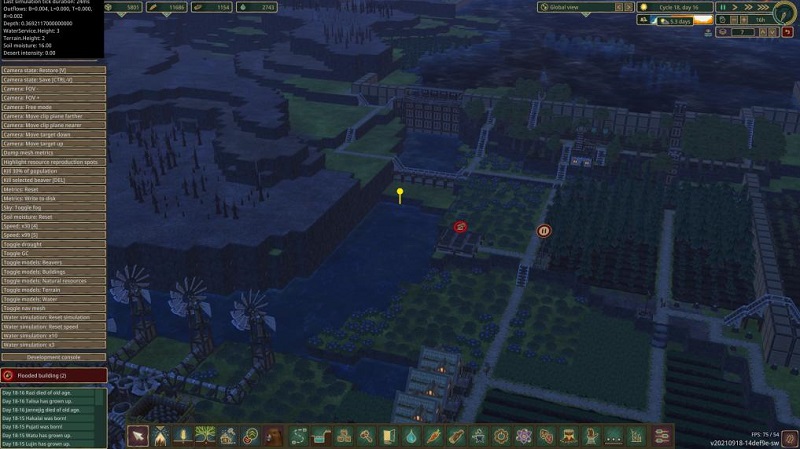

Alt + Shift + X then offers access to the debug mode panel, which may not include cheats, but does offer more options in terms of tinkering with Timberborn.
After pressing the keys above and gaining access to the developer console, Timberborn’s console commands and cheats will be listed on the left side of the screen and one click away from you. Here are the most notable options available so far:
- Add 1000 science - Adds 1000 science
- Camera State: Restore - Restores the saved camera position
- Camera State: Save - Saves camera position
- Camera: FOV - - Reduces the field of view
- Camera: FOV + - Increases the field of view
- Camera: Free mode - Enables free camera
- Camera: Move clip plane farther - Moves the clip plane further away
- Camera: Move clip plane nearer - Moves the clip plane closer
- Camera: Move target down - Lowers the camera
- Camera: Move Target up - Raises the camera
- Dump Mesh Metrics - Creates mesh metrics file in dedicated folder
- Highlight resource reproduction spots - Highlight resources
- Jump to next daytime - Jumps to the next time of day
- Jump to next season - Jumps to the next season
- Kill 30% of population - Kills 30% of your beavers (you monster)
- Kill all characters except selected - Kills all characters except the one selected
- Kill all characters instantly - Kills all characters
- Kill selected beaver [Delete] - Kills the highlighted beaver
- Sky: Toggle fog - Turns fog on/off
- Soil moisture: reset - Resets soil moisture
- Speed x0.25 [Shift+1] - 0.25 times game speed
- Speed x30 [4] - 30 times game speed
- Speed x99 [5] - 99 times game speed
- Toggle GC - Toggles GC
- Toggle models: Beavers - Toggles beaver models on/off
- Toggle models: Buildings - Toggles buildings on/off
- Toggle models: Natural resources - Toggles natural resources on/off
- Toggle models: Terrain - Toggles terrain on/off
- Toggle models: Water - Toggles water on/off<
- Water simulation: Reset all - Resets water simulation
- Water wheels: decrease max speed - Decreases water wheel max speed
- Water wheels: increase max speed - Increases water wheel max speed
Aside from the Timberborn console commands and cheats listed above, you also gain access to a handful of new buttons that enable you to spawn beavers, place water sources, ruins, or barriers, instantly complete a building, and delete various objects from the map.
That’s what we know so far about Timberborn console commands and cheats. For more help with the game, drop by our article on using the water dump.
For the latest gaming news, follow GameWatcher on BlueSky, check out our videos on YouTube. We sometimes include affiliate links in our posts, which grants us a small commission, thank you. Please support independent Games Media. ❤️